
Thinking about canceling your Squarespace subscription or requesting a refund? It’s important to know exactly how Squarespace’s refund policy works, since the rules can vary depending on whether you’re canceling a website plan, a domain, or another add-on service.
In this detailed guide, I’ll break down everything you need to know — including refund eligibility, how long refunds take to process, and the limitations you should be aware of.
Whether you just signed up or you’re no longer satisfied with your current plan, I’ve also outlined a clear, step-by-step process to help you request a refund with confidence.
Let’s take a closer look at how Squarespace’s refund policy works!
Squarespace Refund Policy Details
Squarespace offers refunds under specific conditions, primarily for new subscriptions. Here’s a quick overview:
Eligibility For Refunds
- New Subscriptions: Refunds are available for new subscriptions within the first 14 days.
- Annual Website Subscriptions: Refunds are automatically issued if you cancel within 14 days of purchase.
- E-commerce Transactions: Refunds issued to your customers are managed by you, the seller, through the Squarespace Commerce dashboard. Processing fees from payment providers may or may not be refunded.
Refund Processing Time
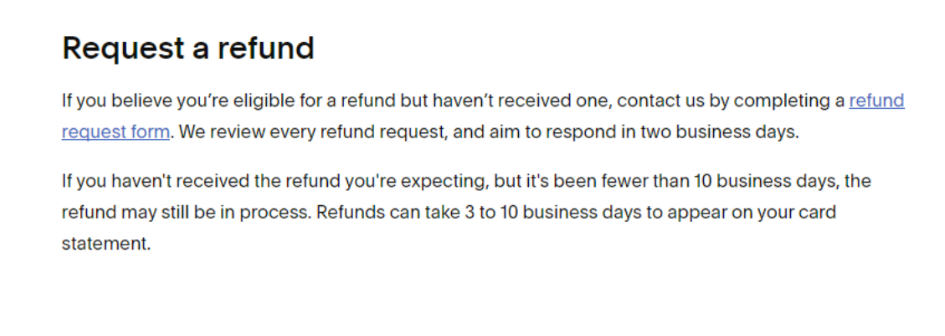
Refunds usually take about 5–10 business days to process and appear back on your original payment method.
Refund Limitations
- Domain Refunds: Only refundable within the first five days of registration. Domains transferred to Squarespace are non-refundable.
- Third-Party Products: Refunds for third-party products or services purchased through Squarespace are subject to the terms of the third-party provider.
Cancellation And Refunding Orders
- Canceling Subscriptions: Users can cancel their subscriptions at any time, but refunds are only available under the conditions mentioned above.
- Refunding Orders: Refunds for orders placed through Squarespace Commerce are subject to specific terms and conditions, which can be found in the purchase agreement.
How To Request For A Refund On Squarespace?
Follow these steps to request a refund for your Squarespace subscription or purchase.
For Website and Online Store Plans:
Step 1: Visit the Squarespace website and log in using your account credentials.
Step 2: Go to the billing section and select the subscription or order for which you want a refund.
Step 3: Follow the prompts to submit a refund request. Provide any necessary information or reasons for the refund.
For Purchased Domains
Step 1: Access your Squarespace account.
Step 2: Go to the Domains section in your account settings.
Step 3: Choose the domain you wish to cancel and request a refund for.
Step 4: Follow the instructions to submit a refund request for the domain.
Refunds are only possible if the domain is canceled within five days of purchase. After that, refunds are not available.
What If You Don’t Get A Refund?
If your refund request for a Squarespace subscription or purchase is not approved, there are a few steps you can take:
1. Review the Refund Policy: Ensure that you fully understand the refund policy and eligibility criteria. Squarespace typically offers refunds for new subscriptions within the first 14 days. Other products and services, such as custom domains, may have different policies.
2. Contact Customer Support: If your refund request is denied, you can reach out to Squarespace customer support for further assistance. Explain your situation and provide any relevant details or documentation that may support your case.
3. Escalate the Issue: If you are not satisfied with the initial response from customer support, ask to escalate the issue to a higher level of support or a manager. They may have more authority to approve your refund request.
4. Check for Alternative Solutions: If a refund is not possible, consider other solutions that Squarespace might offer, such as account credits or discounts on future purchases.
5. Provide Feedback: If you are still unhappy with the outcome, provide feedback to Squarespace about your experience. This can help them improve their policies and customer service.
For more detailed information and to submit a refund request, you can visit the Squarespace Refund Policies page.
If you think you are eligible and have still not received a refund, submit a request here.
Conclusion: Some Squarespace Services Are Eligible For Refunds
Squarespace does provide refunds, but only under certain conditions. By understanding the eligibility rules, timelines, and restrictions, you can manage cancellations and refund requests far more smoothly.
Whether you’re dealing with a website plan, an online store subscription, or a newly purchased domain, knowing the correct steps upfront can save you time and frustration. And if anything becomes unclear along the way, Squarespace’s customer support team can step in to help.
Staying informed about how the refund process works ensures you make the right choices for your subscription — and avoid any unnecessary stress.
FAQs
Can I pause my subscription instead of canceling it?
Squarespace does not offer the option to pause subscriptions. You would need to cancel your current plan and resubscribe when needed.
What if I accidentally delete my website? Can I get a refund?
Unfortunately, deleting your website does not entitle you to a refund. Always ensure you have a backup and confirm actions before proceeding.
Are there any refunds for promotional subscriptions?
Promotional subscriptions are non-refundable. This applies to any discounted plans or special offers.
Can I transfer my subscription to someone else?
Subscriptions are non-transferable. Each subscription is tied to the original account holder.
What happens to my data if I cancel my subscription?
Your data will be saved for a limited period, allowing you to reactivate your subscription and retain your website content. Ensure to back up important data before canceling.
Will I be notified before my subscription renews?
Squarespace typically sends a notification email before your subscription renews, giving you a chance to cancel if needed.
